
Thanks so much for stopping by! I hope you'll engage by leaving comments, be encouraged, occasionally chuckle at discovered quirkiness, and even be inspired in faith. Please use the button to subscribe via email so you won't miss a post!
First-time blogging and Tumblr

 “Blogging” is such a huge, insurmountable concept for most people. Even if they journal or write regularly, the thought of trying to produce a blog – the technicalities, the how-to’s, etc. are overwhelming. After all, for someone who simply wants to type something in and have it show up in an attractive fashion on the net, there’s few options.
Even services like Typepad, Multiply, Vox, WordPress.com, and others offer so many features, that a first-timer can go cross-eyed and in a sudden case of info-overload, give up. Yet, there are probably thousands of folks like that who could make invaluable contributions to friends, family and the globe if they could be encouraged to “take the next step.”
That’s why I recommend Tumblr for first-timers. It’s wonderfully easy, and very intuitive. For instance, this is what I see when I log into my Tumblr dashboard:
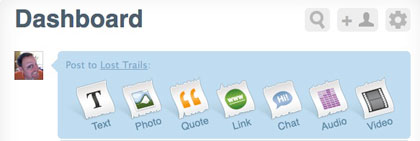
Pretty simple, huh. If I want to post a simple paragaph or two, I click “Text.” If a photo, then voila, click “Photo.” It’s that easy.
Now for the really cool part… some of you have been following the Lifestream series with interest, and Tumblr allows you to combine the different services you use and have them all posted in your Tumblog (the name given to a blog on Tumblr). While most first-time bloggers aren’t using Twitter or YouTube or Flickr, they might in the future, and Tumblr lets you import your information in the form of an RSS feed from those services. Most of the stuff in my Tumblr are feeds imported from other places. I actually don’t input directly into Tumblr that often. It may be one of the best Lifestream compilers out there – since you can customize its look and feel.
So… for those of you would-be bloggers out there, stop by Tumblr today, and create your first Tumblog. Send me the link, and I’ll be sure to publish it here so you’ll get some initial traffic and feedback! If you do stop by, mention my name, and you’ll get a good seat…
For further reference and resources:
- Theme customization:
– wisdump.com – 5 Tumblr themes
– tumblrthemes.com – Nice assortment of attractive Tumblr themes
-And, of course, you can always Google “Tumblr themes”



By the way, if any of you open up a Tumblr account and begin using it, comment here, so I can “follow” you on Tumblr.
[…] a thought sorterBlogging for personal growthWordpress theme winner, blog commenting, and networkingFirst-time blogging and TumblrAdios Twitter, for […]